If you’ve ever been in the middle of a shoot and your Canon DSLR suddenly flashes Error 20, you know how frustrating it can be. One moment everything works perfectly—then your camera locks up, the shutter won’t fire, and an unfamiliar code appears on the LCD screen. In 2026, despite rapid advances in mirrorless systems, millions of photographers still rely on Canon DSLRs—and Error 20 remains one of the most confusing technical faults users encounter.
TL;DR: Canon DSLR Error 20 is usually related to a mechanical shutter malfunction, though it can also stem from aperture or internal hardware issues. A simple restart or battery reset sometimes fixes it, but persistent cases often require shutter replacement. You can diagnose the severity by testing lenses, resetting firmware, and listening for unusual shutter sounds. If basic troubleshooting fails, professional repair is typically necessary.
What Is Canon DSLR Error 20?
Error 20 is a general mechanical malfunction code that appears on many Canon DSLR models, including popular cameras from the EOS Rebel, EOS 70D–90D series, and older 5D and 6D lines. Unlike memory card or battery errors, Error 20 generally points to a problem involving:
- The shutter mechanism
- The mirror assembly
- The lens aperture control
- Internal mechanical components
In most cases, the root cause is a failing shutter. The shutter has a finite lifespan—often rated between 100,000 and 200,000 actuations depending on the model. Once that limit approaches, mechanical failures become more likely.
Common Symptoms of Error 20
Error 20 rarely appears without warning. Here are signs that may precede or accompany the error:
- The shutter sounds different (softer, delayed, or incomplete)
- The camera freezes after pressing the shutter
- The mirror sticks in the up position
- Photos appear partially black
- The camera powers on but won’t take photos
If you notice inconsistent shutter behavior before the message appears, the shutter mechanism is the most likely cause.
Why Error 20 Happens
Let’s break it down into the most common causes in 2026.
1. Shutter Failure (Most Common)
The shutter is a delicate curtain system that opens and closes in milliseconds. Over time, wear and tear on springs, blades, or motors can cause partial or total failure.
Typical clues:
- Camera works intermittently
- Photos are half exposed
- Error appears during high-speed burst shooting
2. Lens Aperture Malfunction
Sometimes, the camera body is fine—but the lens aperture diaphragm gets stuck. If the aperture cannot stop down correctly, the camera may throw Error 20.
This is easier (and cheaper) to fix than shutter failure.
3. Mirror Box or Internal Mechanism Issues
Though less common, broken internal gears or mirror actuation failures can trigger this error. This typically happens after:
- Dropping the camera
- Water or moisture exposure
- Extreme cold use
4. Firmware or Communication Glitches
Occasionally, Error 20 is not mechanical at all. Electrical communication glitches between the lens and body can falsely trigger it.
Step-by-Step: How to Fix Canon DSLR Error 20
Before assuming the worst, follow these troubleshooting steps in order.
Step 1: Power Cycle the Camera
- Turn the camera off.
- Remove the battery.
- Wait at least 5–10 minutes.
- Reinsert the battery and power on.
This clears temporary electrical faults.
Step 2: Clean Lens Contacts
Remove the lens and gently clean the gold contacts using a microfiber cloth or pencil eraser.
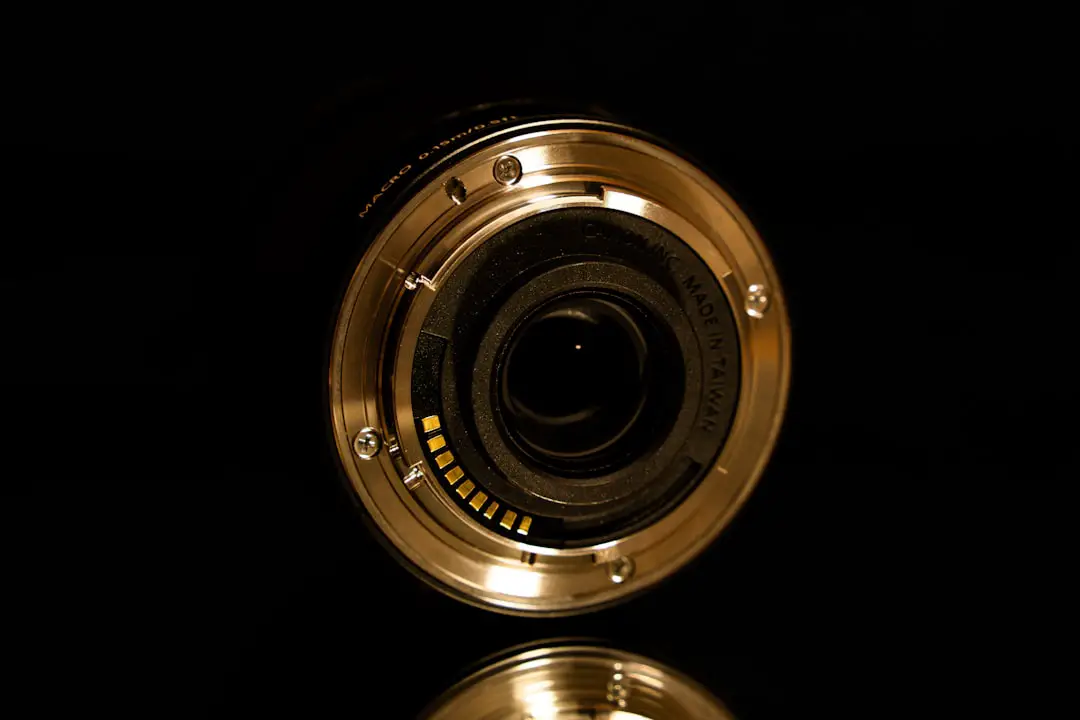
Dirty contacts can interrupt communication and trigger false mechanical errors.
Step 3: Try a Different Lens
If the error disappears with another lens attached, the problem lies with the original lens—not the camera body.
Step 4: Reset Camera Settings
Navigate to your camera menu and perform a factory reset. This eliminates possible configuration conflicts.
Step 5: Update Firmware
Visit Canon’s official support site and ensure your firmware is up to date. While rare, firmware bugs can occasionally cause misfires.
Step 6: Listen to the Shutter
If you hear:
- A weak or hesitation sound
- A double-click when pressing once
- No movement at all
The shutter is likely failing mechanically.
When You Need Professional Repair
If all the above steps fail, professional repair is the next move. Shutter replacement is the most common fix.
Average Repair Costs in 2026
| Repair Type | Average Cost (USD) | Recommended? |
|---|---|---|
| Shutter Replacement (Entry DSLR) | $180–$250 | Yes, if camera value exceeds repair cost |
| Shutter Replacement (Pro DSLR) | $300–$450 | Usually worth it |
| Lens Aperture Repair | $120–$250 | Yes |
| Mirror Box Assembly Repair | $300–$500+ | Depends on camera age |
If your DSLR is worth less than the repair cost, upgrading may make more financial sense.
Is It Worth Fixing in 2026?
DSLRs are no longer the newest technology, but that doesn’t mean they’re obsolete. Many photographers prefer:
- Optical viewfinders
- Long battery life
- Affordable used lens markets
If you own a high-end DSLR like a Canon 5D IV or 90D, repair is often worthwhile. Entry-level Rebels older than 8–10 years may not justify a full shutter replacement.
How to Prevent Error 20 in the Future
Mechanical wear can’t be completely avoided—but you can extend your shutter’s life.
1. Avoid Unnecessary Burst Shooting
High-speed continuous shooting accelerates shutter wear.
2. Protect from Dust and Moisture
Internal debris can interfere with mechanical components.
3. Don’t Force the Shutter
If something sounds wrong, stop shooting immediately.
4. Monitor Shutter Count
You can check shutter actuations using specialized software. If your camera approaches its rated limit, begin budgeting for replacement.
Quick Troubleshooting Checklist
Before panicking, confirm the following:
- Battery is fully charged
- Lens contacts are clean
- Error persists with different lenses
- Factory reset performed
- Firmware updated
If all are checked and Error 20 still appears, it’s almost certainly a mechanical fault.
Final Thoughts
Canon DSLR Error 20 may look mysterious, but in most cases, it boils down to shutter wear. While the message feels dramatic, the solution is often straightforward—either a temporary power reset or a full shutter replacement.
In 2026, DSLRs continue to serve hobbyists and professionals alike. If your camera still delivers the image quality you love, repair is usually a smart investment. But if repair costs approach the price of a modern mirrorless body, it may be time to evolve your kit.
Either way, understanding Error 20 empowers you to make the right decision—quickly, calmly, and confidently—so you can get back to capturing the moments that matter.